
Google Apps Blog update |  |

- Faces of Gmail: Sarah Price
- This week in Docs and Sites: A spreadsheets shortcuts menu, PPTX support and more
- Make multiple calls in Gmail
- A new and improved Gmail gadget for iGoogle
| Posted: 21 Jul 2011 12:19 PM PDT Posted by Kathleen Chen, Consumer Operations In this month's Faces of Gmail we're profiling Sarah Price, our history-loving, lindy-hopping community manager. What do you do on the Gmail team? I'm the Community Manager for Gmail. That means that I watch over Gmail's user forum and talk with Gmail users in other places. For example, I'm one of the people behind @gmail on Twitter and Facebook. If you use Google+, you can follow me there, too!  What's the most challenging part of your job? Gmail users have high expectations for us. They think of Gmail as their own and have great ideas about how to make it better. I love this about our users. Sometimes, though, we make a change that some people love and some people don't like as much. For the people who don't like the change, it can be hard to help them understand why we made it, and that we are still listening to their feedback. What's your favorite part of your job? I love that I get to work with such an amazing product, and I love meeting Gmail users from all over the world, including the "Top Contributors" in our Help Forum. I also love helping people get to know each other. It's very powerful when people come together over a common interest in Gmail. What did you do before coming to Google? I studied Latin Literature at Yale and Ancient History at Oxford. You are probably wondering how I ended up at Google! While I was a student, I also worked as a computer repair technician. I enjoy solving problems and teaching people about technology.  What's your favorite lab? How can I pick just one? I couldn't live without Multiple Inboxes, which I combine with Superstars. Inbox Preview is really cool, too. Which theme do you use? I recently switched to the Preview (Dense) theme. It took a day or two to get used to it, but I like how clean it feels. What's something you think every Gmail user should know about Gmail? Everyone should take a tour through settings. Just click through the pages and see what you find. There's a lot of great stuff in there, and some really important things, too, like options for recovering your account if you ever lose access. What do you do when you're not working on Gmail? I rehearse and perform with my fusion social dance group, Decadance. We do everything from hip hop to waltz -- sometimes in the same piece! I joined Decadance because I love the lead/follow dynamic in partner dance. When I'm not dancing, I love to read, travel and play games, both board games and video games. I'm also starting to plan my wedding. What's your biggest pet peeve? I hate waste when it's easily avoidable. For example, when someone leaves the door ajar on the refrigerator in the office kitchen, or throws away a plastic bottle when there is a recycling bin nearby. If you want to meet Sarah, she will be "hanging out" on Google+ today from 1-2:30pm PDT (8-9:30pm GMT). Photos by Cody Bratt, Google Talk team Update 12:18pm: Removed reference to Gmail Labs feature that's not out yet (but that Sarah was testing).  | ||||
| This week in Docs and Sites: A spreadsheets shortcuts menu, PPTX support and more Posted: 20 Jul 2011 12:47 PM PDT This week, we're introducing a number of enhancements to Google Docs and Sites: a spreadsheets shortcuts menu, support for PPTX conversion, a new RSS gadget, and improved mobile rendering for Sites. Spreadsheets shortcuts Although shortcuts have long been available in your Google spreadsheets, we've added a shortcuts menu to spreadsheets to make them easier to find -- saving you even more time. Hit Ctrl+/ (or Cmd+/ on a Mac) to pull up the list of shortcuts and learn new ways to sharpen your spreadsheet skills. Remember that shortcuts can vary depend on the operating system and browser you're using -- the example below is the menu you'd see if you were using a Chrome browser on a Mac. 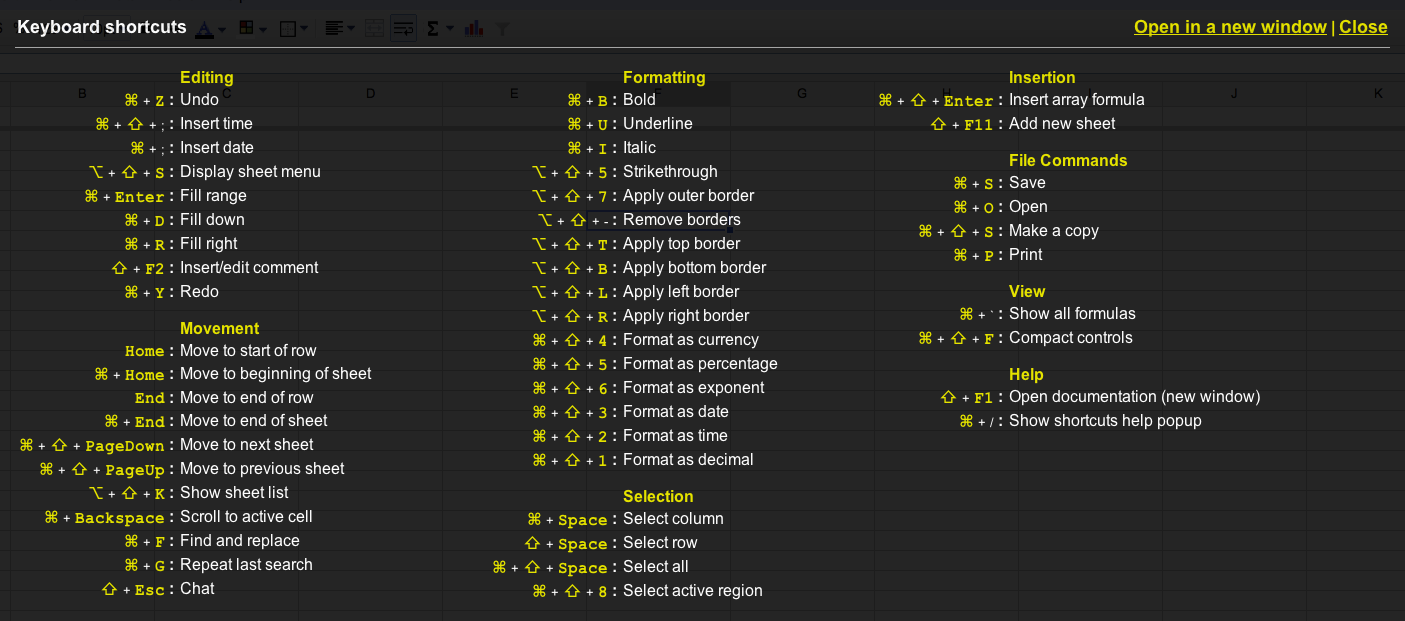 Support for conversion of PPTX files to Google presentations Starting today, you can convert PPTX files to Google presentations by either uploading the file from your desktop or converting the file from your documents list. Just follow the same simple steps as you normally would when converting files to Google Docs formats. Better customization for your RSS Gadget in Sites We've also added a new RSS gadget for Google Sites to our "Featured" gallery.  The new RSS gadget gives you complete control over the appearance of the gadget: You can customize any aspect of the feed, including font, color, size, number of items to display, and post length. To set your gadget, go to Insert > More Gadgets > Featured, and look for RSS Feed.  Improved mobile rendering After we released our initial version of Google Sites automatic mobile rendering, you enabled the option for over 50,000 sites, making it clear that you're looking for a better way to easily publish content for mobile devices. Based on what you've told us, we're adding the additional behaviors to make automatic mobile rendering on Google Sites even better, including:
Thanks for continuing to let us know what you think about our products -- these changes wouldn't be possible without you. Posted by: Rajiv Bammi, Software Engineer  | ||||
| Posted: 20 Jul 2011 05:46 PM PDT Posted by Richard Dunn, Software Engineer Over the years, we've expanded Gmail's communication abilities by allowing you to make voice and video calls to other computers and more recently call phones. Until now, though, you were limited to making one call at a time. Today we're excited to relax that restriction and allow you to make or receive multiple calls in Gmail. If you're in a call and make a second one, your first call will be put on hold while you talk on your new call. You can switch between calls by pressing the "Resume" button on the call you want to talk on, which will automatically put the previous call on hold.  Receiving incoming calls while you're in another call is just as easy: you'll receive a notification of the incoming call and can choose to accept it or not. If you take the new call, the previous call will be put on hold. Whether you make a second call or not, you can now put any call on hold — useful in case you need to talk to someone in the room or grab something off the stove. Just press the "Hold" button and then "Resume" to start talking again. This feature works across all call types (voice, video, and phone); the only restriction is that a maximum of two outgoing calls to physical phones can be placed at once.  | ||||
| A new and improved Gmail gadget for iGoogle Posted: 19 Jul 2011 08:42 AM PDT Posted by David Yonge-Mallo, Software Engineer, Gmail With iGoogle, you can personalize your homepage with the information on the web that's most useful and relevant to you. You can check email, watch videos, catch up on the latest news, check the weather, and more. One of the most common iGoogle requests we've been hearing is to update the iGoogle Gmail gadget. Because the Gmail gadget has to share space with other gadgets on the screen, the Gmail experience can be limited to an area not much larger than the size of a business card. Since we've already built an experience optimized for small screens with Gmail for mobile, we decided to adapt the mobile web version for iGoogle and are now rolling out an updated gadget.  The new Gmail gadget is pretty similar to the mobile experience — it's fast, looks good in small spaces, and includes popular features like search and labeling. By default, it appears in a minimized window (shown above); if you expand it into canvas mode by clicking on the maximize button in the upper right hand corner, you get the two pane view until now provided only on tablet devices (shown below). Going forward, the Gmail gadget will be updated with new features in tandem with the mobile edition.  We'll be rolling out the new Gmail gadget over the next couple weeks. If you're already using the gadget, it will update automatically. If you're not, you can add it to your iGoogle page here. Keep in mind that the new gadget currently requires a WebKit compatible browser, such as Chrome or Safari.  |


| You are subscribed to email updates from The Google Apps Blog To stop receiving these emails, you may unsubscribe now. | Email delivery powered by Google |
| Google Inc., 20 West Kinzie, Chicago IL USA 60610 | |

